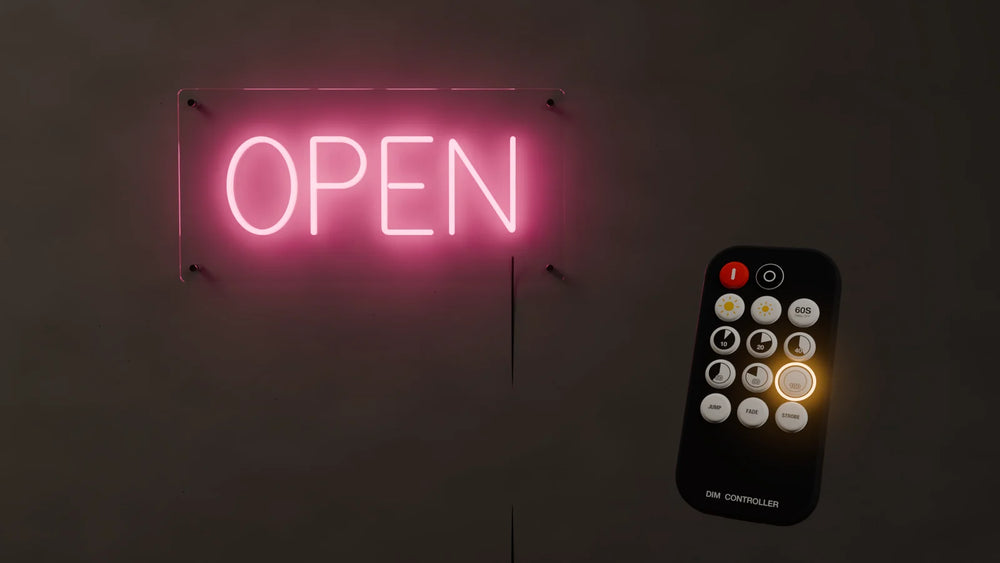
Connect the controller between the sign and the power adapter, pull the plastic tab out of the bottom of the remote, then press the red ON key. The six round keys 10 to 100 set the brightness, the two sun keys fine-tune it, and JUMP, FADE and STROBE are the light effects.
If the remote stops working, unplug the adapter, plug it back in, and within 5 seconds hold ON for 2 seconds to pair it again. The video shows every key in under a minute.
What is in the box
- ✓ The remote: a small black remote with 15 keys, marked DIM CONTROLLER at the bottom. The battery is already inside.
- ✓ The controller: a small box on a short cable, marked INPUT at one end and OUTPUT at the other.
- ✓ The power adapter that came with your sign.
What each key does
| Key | What it does |
|---|---|
| Red key (I) | Turns the sign on |
| Round key (O) | Turns the sign off |
| Big sun / small sun | Brighter / dimmer. While an effect is running: faster / slower |
| 60S | Turns the sign off by itself after 60 seconds |
| 10, 20, 40, 60, 80, 100 | Steady light at that brightness, in percent |
| JUMP, FADE, STROBE | The three light effects |
Step by step
- Connect the controller (0:03). Plug the sign's cable into the OUTPUT end of the controller and the power adapter into the INPUT end. Plug the adapter into the wall last, once everything else is connected.
- Pull out the plastic tab (0:10). A clear plastic strip sticks out of the bottom of the remote. It keeps the battery from running down in the box. Pull it all the way out once, before you use the remote for the first time.
- Turn the sign on and off (0:13). The red key turns it on, the round key next to it turns it off.
- Pick a brightness (0:16). The six round keys marked 10, 20, 40, 60, 80 and 100 jump straight to that brightness, in percent.
- Fine-tune the brightness (0:21). The big sun makes the sign brighter, the small sun makes it dimmer.
- Choose a light effect (0:25). JUMP steps between brightness levels, FADE slowly brightens and dims, STROBE flashes.
- Change the effect speed (0:33). While an effect is running, the same two sun keys change the speed: big sun is faster, small sun is slower.
- Back to steady light (0:40). Press any brightness key, 10 to 100, and the sign stops the effect and stays on at that brightness.
- Turn off in 60 seconds (0:42). Press 60S and the sign switches itself off a minute later. Handy at bedtime.
- Remote not working? Pair it again (0:46). Unplug the adapter from the controller and plug it back in. Within 5 seconds, hold the red ON key for 2 seconds. The controller now answers to that remote.
If the remote does nothing
- ✓ The plastic tab. If it is still in, the battery is not connected. Pull it all the way out.
- ✓ The battery. It is a CR2025 coin cell, sold almost everywhere.
- ✓ The plugs. Check that the sign is in OUTPUT, the adapter is in INPUT, and the adapter is switched on at the wall.
- ✓ Pairing. If the sign works but ignores the remote, pair it again as in step 10.
Two things catch people out: the plastic tab, which makes a brand new remote look dead, and pairing, which is a five second job once you know it. Beyond that, the keys you will use every day are ON, OFF and one brightness key, and 60S if the sign is in a bedroom.
Questions about your sign or remote? Email service@aoos.com or call (213) 328-2667.
Frequently asked questions
Why is my neon sign remote not working?
On a new remote it is almost always the clear plastic tab in the bottom: pull it all the way out. If it still does nothing, check the CR2025 battery and that the sign is plugged into OUTPUT and the adapter into INPUT. If the sign works but ignores the remote, pair it again: unplug the adapter, plug it back in, and within 5 seconds hold ON for 2 seconds.
How do I pair a neon sign remote?
Unplug the power adapter from the controller and plug it back in. Within 5 seconds, hold the red ON key for 2 seconds. The controller recognizes the remote and answers to it from then on.
What battery does the remote take?
A CR2025 coin cell. One comes already fitted; pull out the plastic tab before first use.
How do I stop the sign flashing?
Press any brightness key from 10 to 100. The sign stops the JUMP, FADE or STROBE effect and stays on at that brightness.
Do I have to point the remote at the sign?
No. It is a radio (RF) remote, so it works from any direction and with the controller out of sight.
What does the 60S key do?
It turns the sign off by itself 60 seconds after you press it, so you can switch it off and still have light to get to bed.
We have made neon since 1998, and we still make it ourselves. If something here does not answer your question, ask us.